
Template Literals in JavaScript
JavaScript has continuously evolved to make code cleaner, easier to read, and more developer-friendly. One of the most impactful features introduced in ES6 (ECMAScript 2015) is Template Literals. They provide a modern and efficient way to work with strings in JavaScript.
Before template literals, developers often relied on complicated string concatenation using the + operator. This approach became difficult to manage when dealing with dynamic values, multiline text, or large HTML structures. Template literals solved these problems with a cleaner syntax and improved readability.
In this blog, we will explore what template literals are, why they are important, and how they are used in modern JavaScript applications.
Problems with Traditional String Concatenation
Before ES6, JavaScript developers created dynamic strings using single quotes ('') or double quotes ("") along with the + operator.
Example:
const name = "Aslam";
const age = 23;

const message = "My name is " + name + " and I am " + age + " years old.";

console.log(message);
Output:
My name is Aslam and I am 23 years old.
Although this works, it creates several problems when applications become larger and more complex.
1. Poor Readability
When many variables are involved, the code becomes cluttered with quotation marks and + operators.
const product = "Laptop";
const price = 55000;
const brand = "Dell";

const details =
  "The product " + product +
  " from " + brand +
  " costs Rs. " + price + ".";

console.log(details);
This structure is difficult to read and maintain.
2. Difficult to Manage Long Strings
Building long strings with concatenation often forces developers to break lines manually.
const text = "JavaScript is a powerful programming language " +
             "used for both frontend and backend development.";
The code becomes messy very quickly.
3. Multi-Line Strings Were Complicated
Creating multiline text before template literals required special characters like \n.
const paragraph = "JavaScript is popular.\n" +
                  "It is used in web development.\n" +
                  "It supports modern frameworks.";

console.log(paragraph);
This approach reduces readability and makes formatting difficult.
What Are Template Literals?
Template literals are a modern way to create strings using backticks instead of quotes.
Syntax:
`This is a template literal`
The backtick character is located below the Esc key on most keyboards.
Template literals support:
Embedded variables
Multiline strings
Expressions inside strings
Better formatting and readability
Template Literal Syntax
Basic example:
const language = "JavaScript";

console.log(`I am learning ${language}`);
Output:
I am learning JavaScript
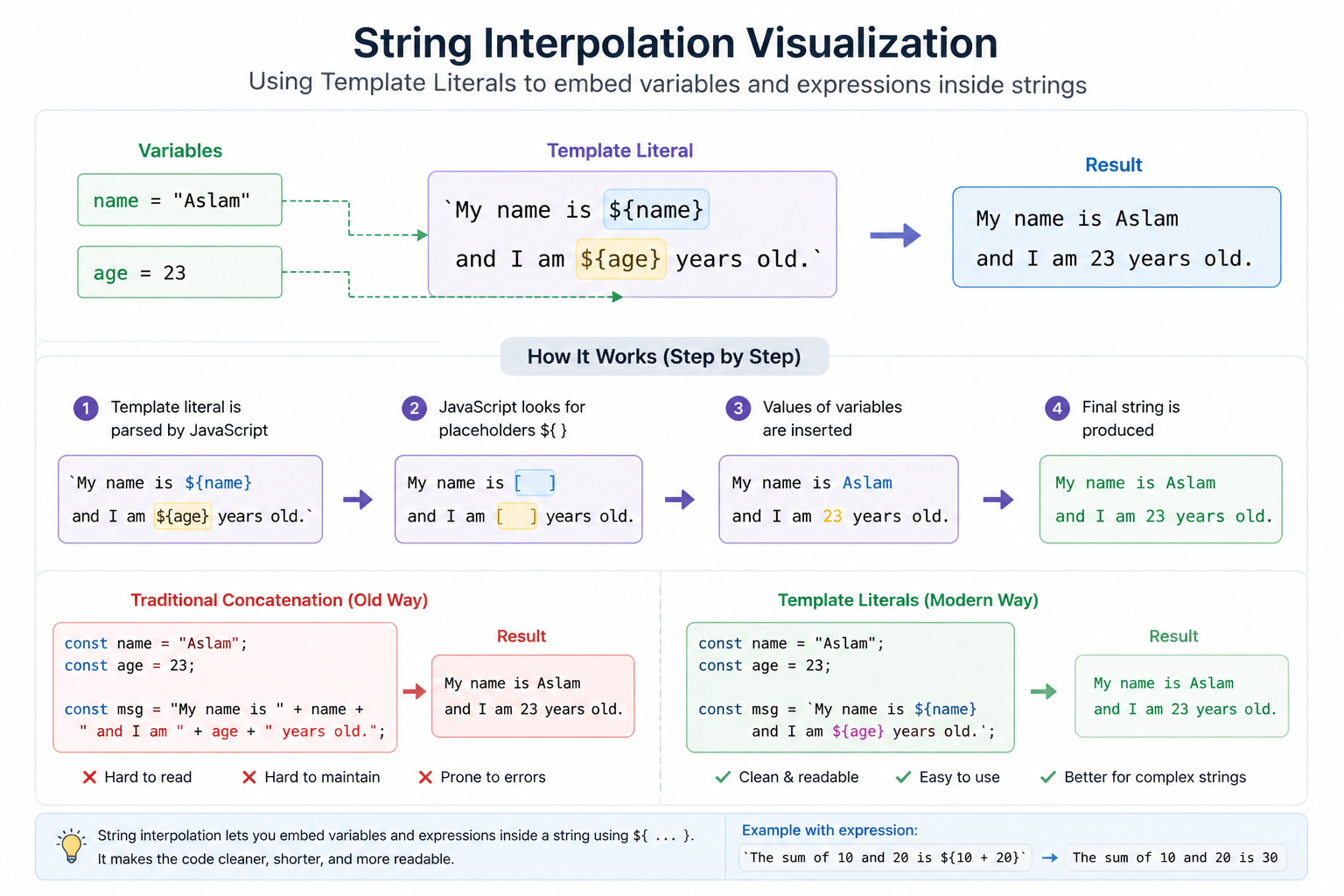
Instead of concatenating strings with +, template literals allow variables to be inserted directly using ${}.
This feature is called string interpolation.
Embedding Variables in Strings
One of the biggest advantages of template literals is embedding variables directly into strings.
Traditional Concatenation
const username = "Aslam";
const score = 95;

const result = "User " + username + " scored " + score + " marks.";

console.log(result);
Using Template Literals
const username = "Aslam";
const score = 95;

const result = `User \({username} scored \){score} marks.`;

console.log(result);
The second approach is cleaner, shorter, and easier to understand.
Embedding Expressions
Template literals are not limited to variables only. You can also insert expressions and calculations directly.
Example:
const a = 10;
const b = 20;

console.log(`The sum is ${a + b}`);
Output:
The sum is 30
You can even call functions inside template literals.
function greet(name) {
  return `Hello ${name}`;
}

console.log(`${greet("Aslam")}, welcome back!`);
Output:
Hello Aslam, welcome back!
This flexibility makes template literals extremely powerful in modern JavaScript applications.
Multi-Line Strings
Another major improvement introduced by template literals is support for multiline strings without using \n.
Old Way
const message = "Welcome to JavaScript.\n" +
                "This is a multiline string.\n" +
                "It was difficult before ES6.";

console.log(message);
Using Template Literals
const message = `
Welcome to JavaScript.
This is a multiline string.
It is much cleaner with template literals.
`;

console.log(message);
Output:
Welcome to JavaScript.
This is a multiline string.
It is much cleaner with template literals.
This improves code formatting and makes long text blocks much easier to manage.
Comparing Traditional Concatenation vs Template Literals
Traditional Concatenation
const item = "Phone";
const price = 30000;

const text = "The price of " + item + " is Rs. " + price + ".";

console.log(text);
Template Literals
const item = "Phone";
const price = 30000;

const text = `The price of \({item} is Rs. \){price}.`;

console.log(text);
Why Template Literals Improve Readability
Template literals make JavaScript code easier to read because:
Variables are directly visible inside strings
No unnecessary
+operatorsCleaner formatting for long strings
Better handling of multiline content
Easier debugging and maintenance
When developers work on large projects, readability becomes extremely important. Cleaner code reduces confusion and improves productivity.
Use Cases in Modern JavaScript
Template literals are heavily used in modern JavaScript development. Let us look at some practical use cases.
1. Generating HTML Dynamically
Template literals are commonly used to create HTML content dynamically.
const name = "Aslam";

const html = `
<div>
  <h1>Hello ${name}</h1>
  <p>Welcome to the website</p>
</div>
`;

console.log(html);
This is widely used in frameworks like React, Vue, and Angular.
2. API Response Messages
When working with APIs, template literals help create dynamic messages.
const status = "Success";
const code = 200;

console.log(`Request completed with status \({status} and code \){code}`);
3. Logging Information
Developers frequently use template literals while debugging applications.
const user = "Aslam";
const loginTime = "10:30 AM";

console.log(`User \({user} logged in at \){loginTime}`);
4. Email and Notification Templates
Applications often generate personalized messages.
const customer = "Rahul";

const email = `
Dear ${customer},

Thank you for purchasing our product.

Regards,
Support Team
`;

console.log(email);
5. Building URLs
Template literals make URL generation simpler.
const userId = 101;

const url = `https://api.example.com/users/${userId}`;

console.log(url);
Tagged Template Literals
JavaScript also supports advanced functionality called tagged template literals.
Example:
function highlight(text, name) {
  return `\({text[0]}\){name.toUpperCase()}${text[1]}`;
}

const user = "Aslam";

console.log(highlight`Hello ${user}!`);
Tagged templates allow developers to customize how template literals behave. They are useful in libraries, styling systems, and advanced formatting tasks.
Best Practices for Using Template Literals
Use Template Literals for Dynamic Strings
Whenever a string contains variables or expressions, template literals are usually the better option.
Avoid Unnecessary Concatenation
Instead of mixing template literals with +, keep the formatting consistent.
Bad example:
const text = "Hello " + `${name}`;
Better example:
const text = `Hello ${name}`;
Use Multiline Formatting Carefully
Template literals preserve spaces and line breaks exactly as written. Improper indentation may affect output formatting.
Conclusion
Template literals are one of the most useful features introduced in modern JavaScript. They solve many problems associated with traditional string concatenation and significantly improve code readability.
With template literals, developers can:
Embed variables directly into strings
Create multiline text easily
Insert expressions and function calls
Build cleaner and more maintainable code
In modern JavaScript development, template literals are widely used in frontend frameworks, backend applications, APIs, and dynamic content generation. They reduce complexity and make code more expressive.