
Blocking vs Non-Blocking Code in Node.js
Modern web applications are expected to respond quickly, even when thousands of users are using them at the same time. One of the biggest reasons Node.js became popular is its ability to handle operations efficiently using non-blocking code.
To understand how Node.js achieves high performance, you first need to understand the difference between blocking and non-blocking execution.
Understanding Blocking Code
Blocking code stops the execution of further code until the current operation finishes.
This means the program waits for one task to complete before moving to the next task.
Imagine standing in a queue at a coffee shop where only one customer can order at a time. Everyone behind must wait until the current order is completed. That is similar to blocking behavior.
Simple Flow of Blocking Code
Start task
Wait until task finishes
Continue next task
During the waiting time, the program cannot do anything else.
Example of Blocking Code in Node.js
Node.js provides synchronous methods that work in a blocking manner.
const fs = require("fs");

console.log("Start");

const data = fs.readFileSync("file.txt", "utf8");

console.log(data);

console.log("End");
What Happens Here?
readFileSync()reads the file synchronouslyThe program pauses until the file is fully read
Only after completion does execution continue
Output Flow
Start
(file content)
End
Even if the file takes several seconds to load, Node.js waits.
Why Blocking Code Slows Servers
In a server environment, many users send requests simultaneously.
If one request performs a blocking operation:
The server becomes busy waiting
Other incoming requests are delayed
Response time increases
Overall performance decreases
This becomes dangerous when handling:
Large file operations
Database queries
External API calls
Heavy calculations
Real-World Analogy
Think of a restaurant with one waiter.
Blocking Style
The waiter:
Takes one order
Goes to kitchen
Waits for food
Returns food
Only then takes the next order
All customers wait longer.
This creates a bottleneck.
Understanding Non-Blocking Code
Non-blocking code allows the program to continue executing other tasks while waiting for an operation to complete.
Instead of waiting, Node.js starts the operation and moves forward immediately.
When the task finishes, a callback, promise, or async handler processes the result.
Example of Non-Blocking Code
const fs = require("fs");

console.log("Start");

fs.readFile("file.txt", "utf8", (err, data) => {
    if (err) {
        console.log(err);
        return;
    }

    console.log(data);
});

console.log("End");
What Happens Here?
readFile()starts reading the fileNode.js does not wait
Execution continues immediately
When file reading finishes, callback executes
Output Flow
Start
End
(file content)
Notice that "End" appears before the file content.
This is the key behavior of non-blocking execution.
Blocking vs Non-Blocking Comparison
| Feature | Blocking Code | Non-Blocking Code |
|---|---|---|
| Execution | Waits for task completion | Continues execution |
| Server Performance | Slower under heavy load | Faster and scalable |
| User Experience | Delays requests | Handles multiple requests efficiently |
| Common Methods | Synchronous methods | Asynchronous methods |
| Resource Usage | Less efficient | More efficient |
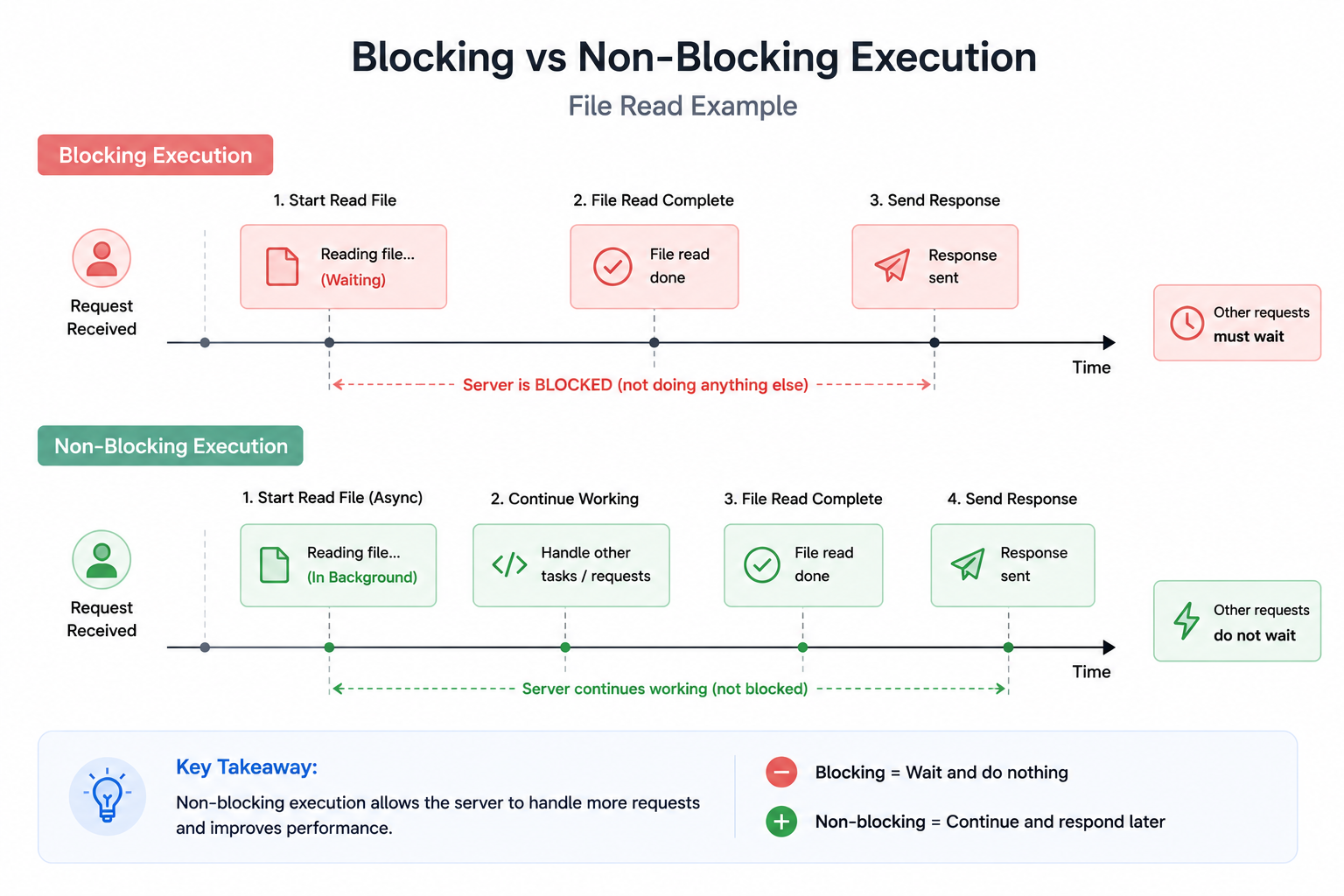
Async Operations in Node.js
Node.js is designed around asynchronous operations.
Common async tasks include:
File handling
Database queries
API requests
Timers
Network communication
These operations take time to finish. Instead of stopping the entire application, Node.js delegates them and continues running other code.
How Node.js Handles Async Operations
Node.js uses:
Event-driven architecture
Event loop
Non-blocking I/O
This allows Node.js to manage many operations concurrently without creating heavy threads for every request.
Simplified Process
Request arrives
Async task starts
Node.js continues handling other requests
Task finishes later
Callback or promise handles result
This design makes Node.js highly efficient for web servers.
File Handling Scenario
Let us compare a real server situation.
Blocking File Read
const fs = require("fs");

app.get("/data", (req, res) => {
    const data = fs.readFileSync("largeFile.txt", "utf8");

    res.send(data);
});
Problem
If reading the file takes 5 seconds:
Every user waits
Server becomes less responsive
Multiple requests start piling up
Non-Blocking File Read
const fs = require("fs");

app.get("/data", (req, res) => {
    fs.readFile("largeFile.txt", "utf8", (err, data) => {
        if (err) {
            return res.status(500).send("Error");
        }

        res.send(data);
    });
});
Advantage
While the file is being read:
Node.js can handle other users
Server remains responsive
Better scalability
This is why asynchronous code is preferred for server applications.
Database Calls and Non-Blocking Behavior
Database operations are naturally slow because they involve:
Disk access
Network communication
Query execution
If database calls were blocking, the server would freeze during every query.
Example
app.get("/users", async (req, res) => {
    const users = await User.find();

    res.json(users);
});
Here:
Database query runs asynchronously
Node.js can process other requests meanwhile
Better throughput is achieved
Understanding Waiting vs Continuing Execution
The easiest way to understand this concept is:
Blocking
"I will wait here until this work finishes."
Non-Blocking
"I started the work. While it finishes, I will do other tasks."
This difference is the foundation of Node.js performance.
Does Non-Blocking Mean Parallel Execution?
Not exactly.
Node.js is single-threaded for JavaScript execution, but it handles asynchronous operations smartly using:
Event loop
Background system threads
OS-level async handling
This creates concurrency without traditional multi-threaded complexity.
Simple Difference
Parallelism
Multiple tasks running literally at the same time.
Concurrency
Managing multiple tasks efficiently without waiting unnecessarily.
Node.js focuses heavily on concurrency.
When Blocking Code Is Acceptable
Blocking code is not always wrong.
Synchronous operations can be acceptable for:
Small scripts
Startup configuration loading
One-time setup tasks
Debugging
But inside production servers, blocking operations should usually be avoided.
Best Practices for Node.js Performance
Prefer Async APIs
Use:
fs.readFile()Database async methods
Promises
async/await
instead of synchronous alternatives.
Avoid Heavy CPU Tasks
CPU-intensive work can still block the event loop.
Examples:
Large loops
Video processing
Image compression
Complex calculations
These tasks are better handled using:
Worker threads
Separate services
Queues
Use Async/Await for Cleaner Code
Modern Node.js commonly uses async/await.
async function getData() {
    const data = await fs.promises.readFile("file.txt", "utf8");

    console.log(data);
}
This keeps asynchronous code readable while still being non-blocking.
Final Thoughts
The difference between blocking and non-blocking code is one of the most important concepts in Node.js.
Blocking code forces the application to wait before moving forward. Non-blocking code allows Node.js to continue handling other tasks while operations complete in the background.
This behavior is a major reason why Node.js performs exceptionally well for:
APIs
Real-time applications
Streaming platforms
Chat systems
High-concurrency web servers