
Array Flatten in JavaScript
Modern JavaScript applications work with data everywhere. APIs, databases, user inputs, and UI components often return data in nested structures. Because of this, understanding how to flatten arrays is an important skill for every JavaScript developer.
Flattening arrays is also a common interview topic because it tests problem solving, recursion, loops, and understanding of array methods.
In this blog, you will learn:
What nested arrays are
Why flattening arrays is useful
The concept of flattening
Multiple approaches to flatten arrays
Common interview scenarios
Step by step thinking process
What Are Nested Arrays?
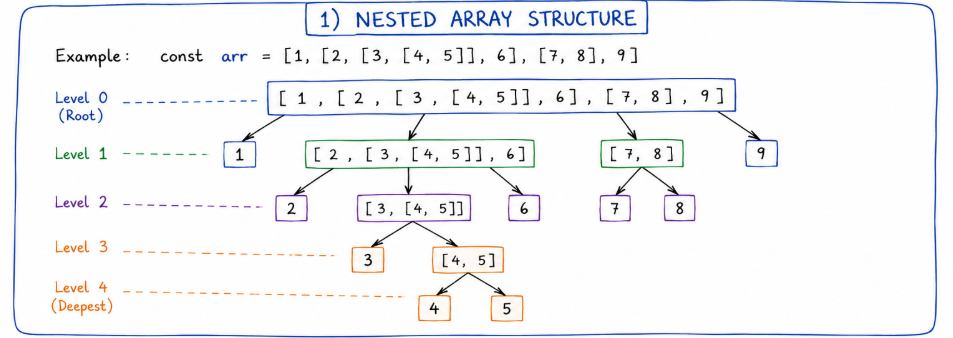
A nested array is simply an array that contains another array inside it.
Example:
const arr = [1, 2, [3, 4]];
Here:
1and2are normal elements[3, 4]is another array inside the main array
More deeply nested example:
const arr = [1, [2, [3, [4, 5]]]];
Visual representation:
[
  1,
  [
    2,
    [
      3,
      [
        4,
        5
      ]
    ]
  ]
]
What Does Flattening Mean?
Flattening means converting a nested array into a single-level array.
Example:
const arr = [1, [2, 3], [4, 5]];
Flattened version:
[1, 2, 3, 4, 5]
Deep nested flattening:
const arr = [1, [2, [3, [4]]]];
Result:
[1, 2, 3, 4]
Why Is Flattening Arrays Useful?
Flattening arrays is useful in many real-world situations.
1. API Data Processing
Sometimes APIs return nested data structures.
Example:
const users = [
  ["Aslam", "John"],
  ["Sara", "Mike"]
];
Flattening helps create one clean list:
["Aslam", "John", "Sara", "Mike"]
2. UI Rendering
Frontend frameworks often need flat arrays for rendering lists.
Example:
products.map(product => ...)
If products are nested, flattening simplifies rendering.
3. Data Analysis
Data manipulation becomes easier when everything is in one level.
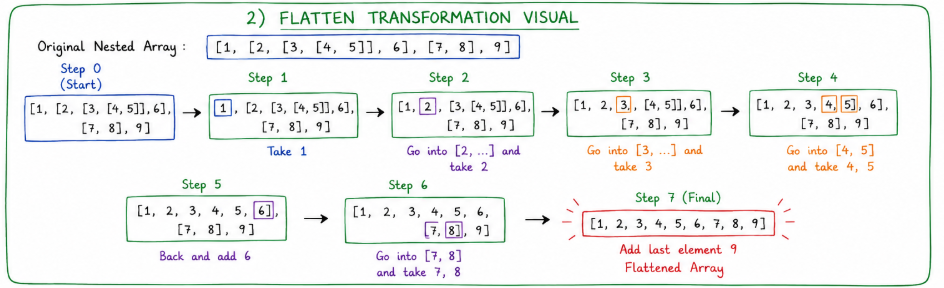
Understanding the Flattening Process Step by Step
Consider this array:
const arr = [1, [2, [3, 4]], 5];
Goal:
[1, 2, 3, 4, 5]
Step 1
Read first element:
1
It is not an array.
Add directly:
result = [1]
Step 2
Next element:
[2, [3, 4]]
This is an array.
We must go inside it.
Step 3
Inside that array:
2
Add it:
result = [1, 2]
Step 4
Next element:
[3, 4]
Again, another array.
Go deeper.
Step 5
Add elements:
result = [1, 2, 3, 4]
Step 6
Return to original array.
Last element:
5
Final result:
[1, 2, 3, 4, 5]
This recursive thinking is the key idea behind flattening arrays.
Different Approaches to Flatten Arrays
1. Using flat()
JavaScript provides a built-in method called flat().
Example:
const arr = [1, [2, 3], [4, 5]];

const result = arr.flat();

console.log(result);
Output:
[1, 2, 3, 4, 5]
Flattening Deeper Levels
const arr = [1, [2, [3, [4]]]];

console.log(arr.flat(2));
Output:
[1, 2, 3, [4]]
Depth 2 means flatten two levels.
Completely Flattening
console.log(arr.flat(Infinity));
Output:
[1, 2, 3, 4]
Advantages
Simple
Readable
Fast to write
Disadvantages
Not supported in very old browsers
Interviewers may ask for manual implementation
2. Using Recursion
This is the most important interview approach.
function flattenArray(arr) {
  let result = [];

  for (let item of arr) {
    if (Array.isArray(item)) {
      result = result.concat(flattenArray(item));
    } else {
      result.push(item);
    }
  }

  return result;
}

const arr = [1, [2, [3, 4]], 5];

console.log(flattenArray(arr));
Output:
[1, 2, 3, 4, 5]
Understanding the Logic
Check Each Element
if (Array.isArray(item))
We check whether the current item is an array.
If It Is an Array
flattenArray(item)
Call the same function again.
This is recursion.
If It Is Not an Array
result.push(item)
Store directly in result.
Visual Recursive Flow
flatten([1, [2, [3]]])

→ 1 added

→ flatten([2, [3]])

    → 2 added

    → flatten([3])

        → 3 added

Final:
[1, 2, 3]
3. Using reduce()
This approach is elegant and functional.
function flattenArray(arr) {
  return arr.reduce((acc, item) => {
    if (Array.isArray(item)) {
      return acc.concat(flattenArray(item));
    }

    return acc.concat(item);
  }, []);
}
Output:
[1, 2, 3, 4, 5]
Why Developers Like reduce()
Cleaner functional style
Compact code
Common in modern JavaScript
But beginners may find recursion with loops easier to understand.
4. Using Loops Only
This approach avoids recursion.
function flattenArray(arr) {
  const stack = [...arr];
  const result = [];

  while (stack.length) {
    const item = stack.pop();

    if (Array.isArray(item)) {
      stack.push(...item);
    } else {
      result.unshift(item);
    }
  }

  return result;
}
Why This Approach Matters
Some interviewers ask:
"Can you solve this without recursion?"
This solution uses a stack-based approach.
It is useful for:
Large nested arrays
Avoiding recursion limits
Common Interview Scenarios
Scenario 1: Flatten Only One Level
Input:
[1, [2, 3], [4, 5]]
Expected:
[1, 2, 3, 4, 5]
Scenario 2: Flatten Completely
Input:
[1, [2, [3, [4]]]]
Expected:
[1, 2, 3, 4]
Scenario 3: Flatten to Specific Depth
Input:
[1, [2, [3, [4]]]]
Depth:
2
Expected:
[1, 2, 3, [4]]
Scenario 4: Do Not Use flat()
Very common interview restriction.
Interviewers want to test:
Logical thinking
Recursion
Problem decomposition
Problem Solving Mindset
When solving flattening problems, think in this order:
1. Is the current item an array?
If yes:
Go deeper
If no:
Store it
2. Repeat the Process
This repeating behavior naturally suggests recursion.
3. Build Final Result Gradually
Do not try to solve everything at once.
Focus on one element at a time.
This mindset helps in many advanced problems too.
Time Complexity
Most flattening approaches take:
O(n)
Where n is the total number of elements.
Because every element is visited once.
Final Thoughts
Array flattening is more than just a JavaScript trick. It teaches an important programming mindset:
Breaking problems into smaller parts
Handling nested structures
Thinking recursively
Building reusable logic
In real projects, flat() is often enough. But for interviews and deeper understanding, recursion and stack-based approaches are extremely valuable.